
A connection timeout error is exactly what it sounds like: your device tried to talk to a server, waited for a response, and eventually gave up. Think of it like calling someone and the phone just rings and rings until you hang up. Somewhere along the line, the communication failed.
This isn't just a generic bug; it's your system's way of protecting itself from waiting indefinitely for a response that might never come.
What a Connection Timeout Error Really Means
When you hit a "connection times out" message, it's tempting to think the website is just down. While that’s one possibility, the reality is often more nuanced. Your browser or application has a built-in stopwatch for every connection it makes. If it doesn't get the expected "hello back" from the server before that timer hits zero, it simply aborts the attempt.
This failure can happen anywhere along the path between you and the server. The culprit could be:
- Network Congestion: The internet isn't a single pipe. Your request might be stuck in a digital traffic jam somewhere.
- Server Overload: The server you're trying to reach might be swamped with other requests and just doesn't have the resources to get to yours in time.
- Firewall Rules: Sometimes, a firewall on your end, or on the server's, will just silently drop your connection request. It doesn't say "no," it just says nothing at all.
Timeout vs. Refused
It’s really important not to confuse a timeout with a "connection refused" error. They mean very different things.
A "connection refused" error is an active, deliberate rejection. The server got your request and immediately slammed the door. A timeout, on the other hand, is pure silence. You knocked, but no one ever came to the door.
A connection timeout is your system’s way of saying, "I waited patiently, but no one answered, so I’m moving on." This distinction is key because it helps narrow down where to start looking for the problem—a timeout often points to network issues or an unresponsive server, while a refusal points to a specific configuration or firewall rule.
To help you diagnose what's happening on your end, here's a quick breakdown of common connection failures.
Common Timeout Scenarios and What They Mean
| Scenario | What It Really Means | Your Potential First Step |
|---|---|---|
| Connection Timed Out | Your request was sent, but the server never responded within the allowed time. It’s like a missed connection. | Check your own internet connection first. The problem might be closer than you think. |
| Connection Refused | The server received your request and actively rejected it. The door was slammed in your face. | Look at firewall rules or application port configurations. Something is actively blocking you. |
| Server Not Found / DNS Error | Your device couldn't even find the address for the server. It's like having the wrong address for a party. | Check for typos in the URL and verify your device's DNS settings. |
Understanding these differences is the first step in troubleshooting. You're not just dealing with an error; you're following clues to the root of the problem.
These aren't just isolated incidents, either. The internet's infrastructure is incredibly complex, and small issues can easily cascade. In early 2025, for example, global internet outages saw a shocking 53% increase in just two months, largely due to infrastructure strain. This trend shows why understanding connection issues is more critical than ever for anyone building or using web services. You can explore more details on these outage patterns to get a sense of the global digital weather.
Pinpointing the Root Cause of Your Timeout Errors
When a connection times out, the error message itself gives you almost nothing to work with. It's like being told "something's wrong" without any details, forcing you to play detective. The key is to stop guessing and start investigating systematically. In my experience, the problem almost always boils down to one of four areas. Figuring out which one is your first real step toward a fix.
This decision tree shows the first, most important question to ask when you hit a connection error.
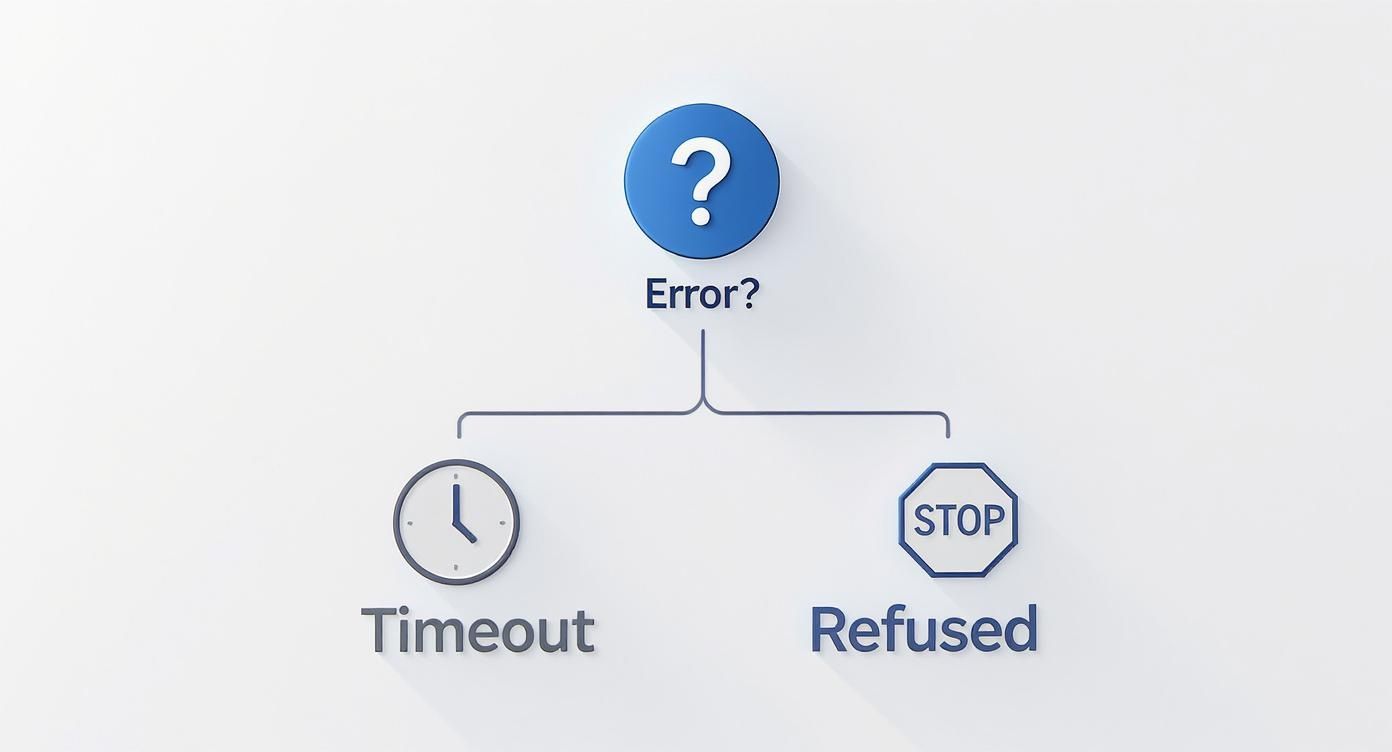
As you can see, a "timeout" and a "connection refused" error send you down completely different diagnostic paths. One means you waited too long for an answer; the other means the door was slammed in your face.
Is the Problem on the Client Side?
Before you start tearing apart server logs or blaming the network, always start with the client—the machine making the request. It’s the easiest place to check, and you’d be surprised how often a simple local misconfiguration is the culprit.
Here are the usual suspects:
- Local Firewalls or Antivirus: Overly aggressive security software is notorious for silently dropping outgoing connections it deems suspicious. A quick way to test this is to briefly disable them and see if the connection goes through.
- Proxy Settings: Are you using a VPN or a corporate proxy? If it's not configured correctly, it can become a black hole for your network traffic, causing requests to time out long before they ever reach the intended server.
What About Network and Infrastructure Failures?
Okay, so the client machine is clean. The next place to look is the path the data travels between the client and the server. Network issues are tricky because they often happen in places you can't control, like with an ISP or a major backbone provider.
Think about an e-commerce checkout. A customer clicks "Pay," and the request heads to a payment gateway. If a critical router between them fails or the network is just completely gridlocked, that request might get lost in transit. The customer's browser waits and waits, and then... timeout.
These aren't always small, isolated incidents. In 2025, government-mandated shutdowns and major power outages continued to be a huge source of internet timeouts. A single cyberattack on one provider in May took their service offline for a full 10 hours, illustrating just how fragile our infrastructure can be.
Could It Be a Server-Side Misconfiguration?
If the request makes it all the way to its destination, the problem might be on the server itself. This means the server received the request but, for some reason, couldn't process it and send back a response in time. This is an incredibly common scenario, especially for applications dealing with a lot of traffic.
I like to think of a server under heavy load as a restaurant kitchen with one chef and a hundred orders. The tickets are piling up, but the chef is overwhelmed and can't cook fast enough. The customers are left waiting, their patience wearing thin. That's a server-side timeout in a nutshell.
A few things can cause this meltdown:
- Resource Exhaustion: The server simply ran out of gas. It has no more memory, CPU cycles, or available connections to handle the new request.
- Application Logic Errors: A nasty bug in the code, like an infinite loop or a deadlock, can freeze the application, preventing it from ever finishing its work and sending a response.
- Upstream Dependencies: Your server might be waiting on another service—like a database or a third-party API—that is itself timing out. For example, your app might hang because it's waiting on an external service that’s enforcing strict API rate limits.
Adjusting Client and Server Timeout Configurations
Once you've got a hunch about what's causing a connection timeout, the next place to look is almost always the timeout configurations on both the client and the server. Think of these settings as the official stopwatch for every connection attempt. If they're misconfigured, you'll see perfectly good requests fail prematurely.
It's a tricky balancing act. You need the timeouts to be long enough for legitimate operations to finish, but short enough to stop stalled connections from hogging all your resources.
Imagine a user trying to upload a large photo from their phone over a spotty 4G connection. If your app’s timeout is too aggressive, it will give up and throw an error even though the server is perfectly healthy and ready to receive the file. The client just didn't wait long enough.
Tuning Your Client-Side Timeouts
The client is where the request starts, and you typically have control over two main timeout settings in your code. Getting these right is key.
Connection Timeout: This is how long your application will wait to establish the initial handshake with the server. For the most part, this can be quite short—a healthy server should accept a new connection almost instantly.
Read Timeout: This one's different. It dictates how long the client will wait for data after the connection is already made. This value often needs to be much more generous, especially for API calls that kick off complex database queries or involve large file transfers.
A classic mistake I see is developers setting one single, massive timeout value for everything. This might stop the errors, but it can also make your app feel sluggish and unresponsive while masking serious performance problems on the back end.
Configuring Server-Side Timeout Policies
Over on the server, a different set of timers is at play. Their job is to protect the server from misbehaving or idle clients and to manage resources efficiently. If a client connects and then goes silent, the server needs a way to reclaim that connection for someone else.
The most important setting here is often the keep-alive timeout. This tells the server how long it should keep a connection open if it's idle between requests.
Set it too low, and you force clients to constantly go through the overhead of reconnecting. Set it too high, and you risk resource exhaustion as idle clients pile up, holding connections open without doing anything.
Finding the right balance is more art than science. I once troubleshooted a system where a misconfigured load balancer with a massive keep-alive timeout was holding thousands of connections open, slowly grinding the servers to a halt. You have to align your server timeouts with real-world client behavior, not just plug in a big number and hope for the best.
At the end of the day, adjusting these values isn't about getting rid of timeouts altogether—they're a critical safety net. It's about tuning them so they catch actual failures, not just slow but legitimate operations.
Building Resilient Systems with Proactive Strategies
Fixing a connection times out error after it happens is one thing. But what if you could build a system that anticipates and gracefully handles these inevitable hiccups? That’s the leap from reactive fixes to proactive design, and it’s what defines modern, robust software.
Instead of just fiddling with timeout values and hoping for the best, let's look at some battle-tested resilience patterns. These strategies shift the fundamental question from "Did the connection succeed?" to "What do we do when it doesn't?" That simple change in perspective is the key to building applications that can weather the storm of today's distributed environments.
Embracing Intelligent Retries with Exponential Backoff
Picture this: a service your application depends on is temporarily overloaded. The absolute worst thing your app can do is immediately slam it with another request. When thousands of clients do this at once, it creates a "thundering herd" that can completely knock the struggling service offline.
This is where exponential backoff becomes your best friend.
Instead of retrying instantly, the client waits a moment before trying again. If that second attempt also fails, it doubles the waiting time. This process continues, giving the downstream service progressively more breathing room to get back on its feet.
A typical flow might look like this:
- First Failure: Wait 1 second before retrying.
- Second Failure: Wait 2 seconds.
- Third Failure: Wait 4 seconds.
- Fourth Failure: Wait 8 seconds, then maybe call it quits and report a definitive failure.
This simple, intelligent delay prevents your application from pouring fuel on the fire, dramatically increasing the odds of a successful connection once the service stabilizes.
Preventing Cascading Failures with the Circuit Breaker Pattern
Exponential backoff is great for temporary blips, but what if a service is well and truly down? Continuously retrying a dead service is just a waste of time and resources, adding pointless latency to your application. For this scenario, we have the circuit breaker pattern.
Think of the circuit breaker in your house. When it detects a dangerous electrical fault, it trips and cuts the power to prevent a fire. The software version does the exact same thing for network calls.
A circuit breaker wraps around your network calls and monitors for failures. If it sees too many connection timeouts or other errors in a short period, it "trips" and immediately fails any new requests without even attempting to connect. This instantly isolates the problem and protects your system from a known failing dependency.
After a cooldown period, the circuit breaker enters a "half-open" state. It'll cautiously let a single request through to test the waters. If it succeeds, the breaker closes, and normal traffic resumes. If it fails, the breaker trips again, starting the timer over.
This strategy is brilliant because it gives the failing service time to recover while preventing a single outage from causing a domino effect across your entire system. These patterns are fundamental to the practices we explore further in our guide on what is chaos engineering, which is all about intentionally testing these failure modes.
Comparing Resilience Strategies at a Glance
Choosing the right strategy depends on the specific problem you're trying to solve. This table gives you a quick rundown of where each pattern shines.
| Strategy | Best For | Complexity | Key Benefit |
|---|---|---|---|
| Simple Retry | Very brief, transient network blips. | Low | Easiest to implement for simple, one-off connection issues. |
| Exponential Backoff | Services that are temporarily overloaded or throttled. | Medium | Avoids "thundering herd" and gives services time to recover. |
| Circuit Breaker | Services that are completely down or experiencing a hard failure. | High | Prevents cascading failures by failing fast and isolating faults. |
Ultimately, a combination of these patterns often provides the most robust solution. You might use exponential backoff within a circuit breaker to handle both temporary slowdowns and complete outages effectively.
These strategies are no longer optional. With external services becoming less reliable, building resilience is critical. In Q1 2025, average weekly API downtime surged by a shocking 60% year-over-year, climbing from 34 minutes to 55 minutes. While the corresponding drop in uptime from 99.66% to 99.46% sounds tiny, it represents millions in lost revenue for businesses.
A great starting point for preventing these issues is to implement a thorough website quality assurance checklist for performance. You can dive deeper into these trends by exploring the increasing challenge of API connectivity at Uptrends.com.
How to Simulate and Test Connection Timeouts
You can't just hope your application is resilient. To really trust your retry logic, circuit breakers, and error handling, you have to see them in action. That means getting out of the realm of theory and actively testing failure scenarios in a controlled way.
Simulating a connection times out error is the only real way to prove your system will behave gracefully when things go wrong. If you skip this, you’re basically waiting for a real outage to expose the flaws in your design. By creating these conditions on your own terms, you can find and fix problems long before they ever affect a user.
Setting Up a Controlled Failure Environment
The most effective way to simulate timeouts is with a mock server that you can program to misbehave on cue. A tool like DotMock is built for this. It lets you create mock API endpoints that deliberately introduce delays or just drop connections, perfectly mimicking what happens when a downstream service gets flaky.
This gives you a safe sandbox to play in. You can hammer your mock server with requests and observe exactly how your client application reacts to the failures—all without touching a single production system. Think of it as a fire drill for your software; you practice for an emergency in a safe, repeatable manner.
My rule of thumb is simple: if I haven't seen the error handling code execute with my own eyes, I don't trust it. Simulating timeouts turns abstract code into tangible, verifiable behavior, which is essential for building systems you can depend on.
Common Timeout Scenarios to Test
With a mock server in place, you can start running drills. It’s not enough to test a single, generic timeout. You need to simulate a variety of real-world conditions to see how your application truly holds up.
Here are a few essential scenarios every developer should be testing:
- Slow Response Time: This is the classic test. Configure your mock endpoint to take longer to respond than your client's configured read timeout. It’s a straightforward way to confirm your timeout settings are actually working.
- Intermittent Failures: Program the mock server to time out on, say, every third or fourth request. This is fantastic for testing your retry logic, especially exponential backoff, to ensure it handles sporadic issues without spamming the service.
- Total Service Outage: Have the mock server drop all incoming connections immediately. This is the ultimate test for your circuit breaker. Does it trip open like it's supposed to, preventing your app from hammering a service that's clearly down?
- Delayed Initial Connection: You can also simulate a slow network handshake where the initial TCP connection takes too long. This specifically validates your connection timeout setting, which is a different beast from the read timeout.
By working through these failure modes one by one, you build a complete picture of your application's resilience. For a deeper dive into related issues, our guide on how to test network latency covers concepts that also impact performance. This kind of proactive testing is what separates hope from certainty—it turns a potential production crisis into just another resolved test case.
Beyond the Quick Fix: Building Resilient Systems
Fixing a connection timeout error feels good, but let's be honest—it's just a temporary win. Another one is always around the corner. The real goal isn't just to squash these bugs as they pop up; it's to build applications that expect them and can handle the occasional hiccup without falling over.
These errors are a fact of life in any system that talks over a network. Instead of treating them as unexpected emergencies, we should see them as predictable events. This shift in perspective is what separates a fragile application from a truly resilient one.
The most reliable systems aren't the ones that never fail—they're the ones built with the expectation of failure. This shift from reactive troubleshooting to proactive resilience engineering is the foundation of modern, dependable software.
So, how do you get there? It starts with a smart diagnostic process—methodically checking the client, network, and server to pinpoint the real issue instead of just guessing. Once you know the cause, you can implement smarter configurations and proven resilience patterns like exponential backoff or circuit breakers.
Ultimately, your best defense is a continuous cycle of improvement. This means actively monitoring performance, regularly simulating failures with tools like DotMock, and constantly refining how your system handles errors. That’s how you build services that stay up and running, even when the connections don't.
Common Questions About Connection Timeouts
Even after walking through all the troubleshooting steps, a few specific scenarios can still leave you scratching your head. Let's tackle some of the most common questions I hear from developers dealing with stubborn timeout errors.
Why Does My Connection Time Out on Public Wi-Fi?
Ah, the dreaded coffee shop Wi-Fi. Public networks are notorious for causing connection timeouts, and it usually boils down to two things.
First, they're often packed with users. This creates a ton of network congestion, which can slow your connection request to a crawl or cause it to get dropped entirely before it ever reaches its destination. Think of it as a traffic jam on the information superhighway.
Second, these networks often have very strict firewalls. To protect their users, they might aggressively block traffic they deem suspicious. Unfortunately, your perfectly legitimate request can get caught in the crossfire, leading to a timeout with no obvious explanation.
Can a VPN Cause Connection Timeouts?
Definitely. A VPN introduces an extra hop for your data. If that VPN server is overloaded, slow, or having its own network problems, it creates a bottleneck. Your request is waiting on the VPN before it can even try to reach the final server, and that delay can easily trigger a timeout.
A misconfigured VPN client is another common culprit. Sometimes a software update changes a setting you weren't aware of, or the client's configuration just doesn't play nice with the server you're trying to reach. This misalignment is a classic cause of sudden connection failures.
A timeout error is just a symptom—it tells you a response didn't arrive in time, but not why. The delay could be anywhere: your machine, the Wi-Fi, the VPN, or the server on the other end.
Is a Timeout Always a Network Problem?
It's easy to blame the network, but that's a common mistake. While networking issues are a frequent cause when a connection times out, the problem can just as easily be on the server side.
Don't forget to check for server-side issues like these:
- Resource Exhaustion: The server might be out of memory or CPU cycles. It’s so overwhelmed with other tasks that it simply can't get to your request in a timely manner.
- Application Deadlock: A bug in the server’s code—think infinite loops or gridlocked database queries—can cause the application to freeze up completely. When that happens, it’s physically incapable of sending back a response.
Stop waiting for real outages to test your application's resilience. With DotMock, you can safely simulate timeouts, slow networks, and other failures to build truly robust software. Create your first mock API in seconds at dotmock.com and start shipping with confidence.