
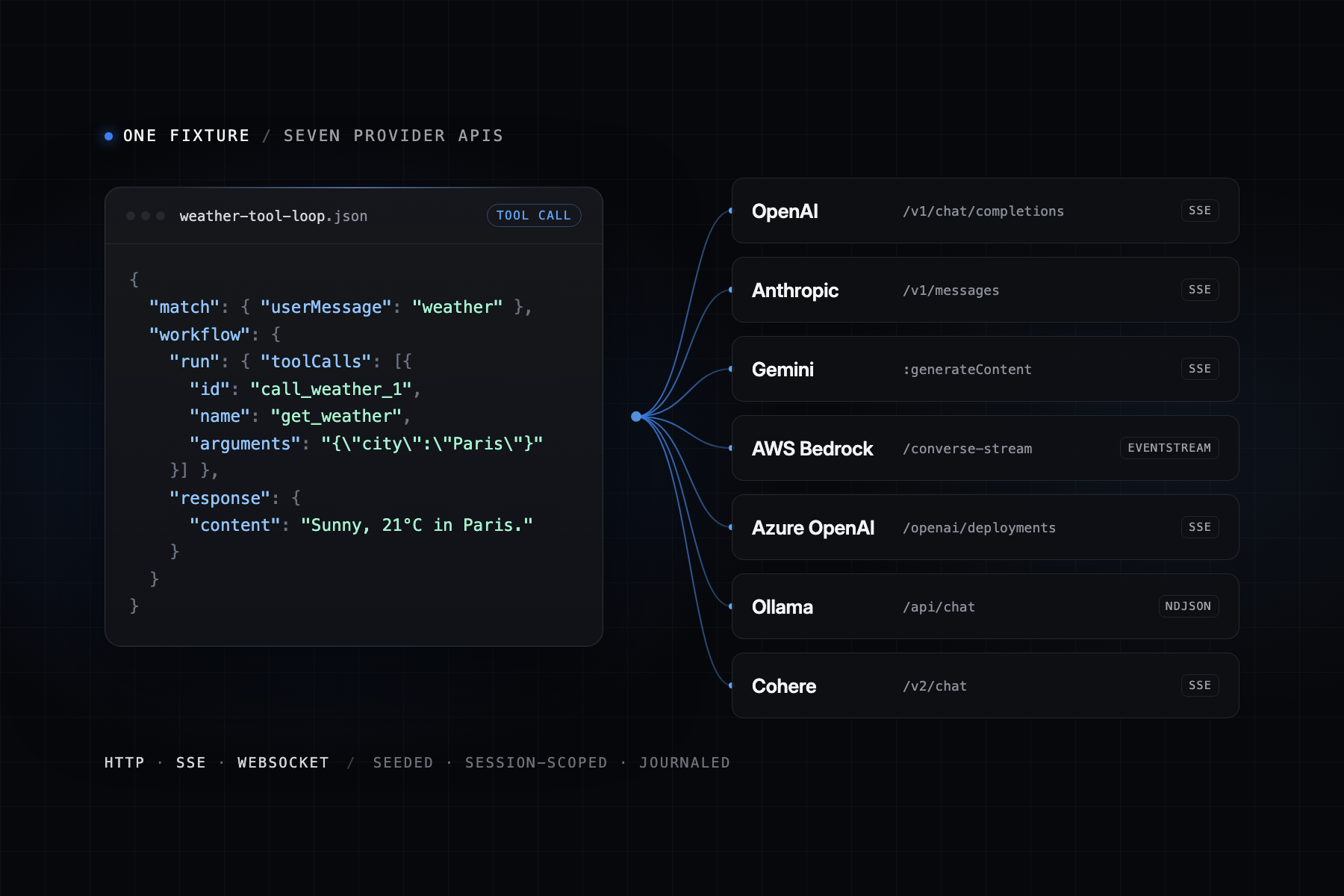
DotMock now mocks seven LLM providers from one set of fixtures.
OpenAI (Chat Completions and the Responses API), Anthropic Messages, Google
Gemini, AWS Bedrock Converse, Azure OpenAI, Ollama, and Cohere all run through
the same matching and rendering pipeline over HTTP, SSE, and WebSocket. The
release also ships a rebuilt fixture editor, @dotmock/cli 0.3.0
with a GitHub Action and test helpers, five new MCP tools for coding agents,
and a new LLM and agents section in the docs.
An application that calls a model has two problems in a test suite. The provider is slow, paid, and nondeterministic, so the same prompt gives a different answer on every run. And the failures that matter most, such as a 429 in the middle of an agent loop, a stream that stops halfway, or a tool call with malformed arguments, almost never happen when you want them to.
This release lets you keep the SDK your application already uses, change its base URL, and decide exactly what the model says, how it streams, and how it fails. Every request is recorded with the fixture that answered it.
Which LLM APIs can DotMock mock?
The provider is detected from the request path. Each route normalizes the request into one shape, evaluates the same fixtures, and renders the winner back in that provider's JSON, SSE, NDJSON, or binary event-stream format. A fixture written once answers all of them.
| Provider | Routes | Streaming format |
|---|---|---|
| OpenAI Chat Completions | POST /v1/chat/completions |
SSE chunks ending in [DONE] |
| OpenAI Responses API | POST /v1/responses, WS /v1/responses |
Named SSE events or WebSocket frames |
| OpenAI Embeddings | POST /v1/embeddings |
None |
| Anthropic Messages |
POST /v1/messages,
POST /v1/messages/count_tokens
|
SSE with thinking and tool-input deltas |
| Google Gemini |
/v1beta/models/{model}:generateContent and
:streamGenerateContent
|
SSE with ?alt=sse, else a JSON array |
| AWS Bedrock |
/model/{id}/converse, /converse-stream,
/invoke, /invoke-with-response-stream
|
Binary application/vnd.amazon.eventstream
|
| Azure OpenAI |
/openai/deployments/{deployment}/chat/completions and
/embeddings
|
SSE |
| Ollama | POST /api/chat, POST /api/generate |
NDJSON |
| Cohere | POST /v2/chat |
SSE message and tool-call events |
Requests are read the way real clients send them. Message content can be a
string, a single part, or an array of parts, so multimodal requests with
images still match on their text. Responses API input can be a plain string
or a list of message, function_call, and
function_call_output items.
The mock also answers the calls SDKs make around a completion.
GET /v1/models lists the models used in your fixtures plus common
defaults, and switches to the Anthropic shape when the request carries an
anthropic-version header. Anthropic's
POST /v1/messages/count_tokens returns
input_tokens. Responses carry non-zero usage counts (estimated at
about four characters per token when a fixture sets none), an
x-request-id, and x-ratelimit-* headers, so client
code that reads them has something real to parse. The full route list is in
the providers and
endpoints reference.
How to point the OpenAI SDK at a mock
Create an LLM workspace, open Connect your app, and copy the
base URL. OpenAI-compatible SDKs take $MOCK_URL/v1 because they
append /chat/completions or /responses. Anthropic,
Gemini, and Ollama SDKs take $MOCK_URL because they append their
own paths. The API key can be any non-empty value.
import OpenAI from "openai";

const client = new OpenAI({
  baseURL: `${process.env.MOCK_URL}/v1`,
  apiKey: "dotmock", // placeholder; never forwarded to a provider
  defaultHeaders: {
    "X-Dotmock-Session": "test-1", // isolates sequence counters and the journal
    "X-Dotmock-Seed": "42", // makes random conditions, chaos, and faker output repeatable
  },
});

const chat = await client.chat.completions.create({
  model: "gpt-4o-mini",
  messages: [{ role: "user", content: "hello" }],
});
console.log(chat.choices[0].message.content);
A new workspace has no fixtures, so the first call returns HTTP 404 with the
error code no_fixture_matched. That proves routing. Once a
fixture matches, the response is provider-shaped and carries
x-dotmock-fixture-id and x-dotmock-fixture-name
headers naming the fixture that won. The
LLM quickstart
has the same setup for Python, Anthropic, Gemini, the Vercel AI SDK,
LangChain, and LlamaIndex.
How to mock a tool-call round trip for an agent
A canned answer does not test an agent. The agent loop sends a request,
receives tool_calls, runs the tool, sends the result back, and
only then gets a final answer. A fixture with a workflow mocks
both halves:
{
  "name": "weather-tool-call",
  "priority": 20,
  "match": { "toolName": "get_weather" },
  "workflow": {
    "run": {
      "toolCalls": [
        {
          "id": "call_weather_1",
          "name": "get_weather",
          "arguments": "{\"city\":\"Paris\",\"unit\":\"celsius\"}",
          "result": "{\"temperatureC\":18,\"condition\":\"sunny\"}"
        }
      ]
    },
    "response": {
      "content": "It is {{tool.get_weather.result}} in {{tool.get_weather.args.city}}.",
      "finishReason": "stop"
    }
  }
}
In phase one, the request has no tool result, so the mock returns the tool
call with finish_reason: "tool_calls". In phase two, the request
contains a role: "tool" message whose tool_call_id
matches, and the mock serves workflow.response. The
placeholders resolve at serve time: {{tool.<name>.result}}
reads the tool message (falling back to the stored result), and
{{tool.<name>.args.<path>}} reads the call's
arguments. Fixture tool-call IDs are used as-is for every provider.
List several entries in toolCalls to return parallel tool calls
in one turn. Add response.reasoning and the text is rendered as
each provider's native thinking output, such as OpenAI
reasoning_content, an Anthropic thinking block, or
Gemini thought parts. Leave content and tool calls empty and the
mock synthesizes a deterministic answer that is valid against the requested
schema, whether that is response_format.json_schema, a Responses
API text.format, a Gemini responseSchema, or an
Ollama format. The
tool-call
workflow guide covers branching on tool errors and turn counts.
For anything the built-in match fields do not cover, match.custom
takes a one-line expression against the raw request, for example
$.metadata.tier == "gold" or
$.tools.# >= 3. It is ANDed with the other match fields.
How to make LLM tests deterministic
Three request headers control repeatability:
-
X-Dotmock-Seed: <int>seeds random conditions, chaos rolls, jitter, faker helpers such as{{uuid}}, and generated IDs. The same seed gives the same output. -
X-Dotmock-Session: <id>selects an isolated namespace for sequence counters and journal entries. Parallel CI jobs can share one mock without advancing each other's sequences. -
sequenceIndexon fixtures with identical match criteria forms a sequence: index N is served on the (N+1)th matching request of the session. Reset a session from the editor, withdotmock llm reset <api> --session ci-42, or withPOST /mock-apis/:apiId/llm-fixtures/reset-sequences.
The session and seed work over WebSocket too. Set them on the upgrade request
and every message on WS /v1/chat or
WS /v1/responses goes through the same counters, chaos, and
journal as HTTP traffic.
How to test 429s, dropped streams, and malformed chunks
Chaos is set per workspace, per fixture, or per request, with rates from 0 to 1. Four actions are available:
- drop returns the provider's error shape immediately;
- malformed corrupts one event and lets the stream continue;
-
disconnect sends
disconnectAfterChunkschunks (half the stream by default) and then kills the connection; and -
rateLimit returns a provider-shaped 429 with
Retry-After, set byretryAfterSeconds(default 1).
From a test, override the rates with X-Dotmock-Chaos-Drop,
X-Dotmock-Chaos-Malformed,
X-Dotmock-Chaos-Disconnect, and
X-Dotmock-Chaos-RateLimit, plus
X-Dotmock-Chaos-Disconnect-After and
X-Dotmock-Chaos-Retry-After. Pair them with
X-Dotmock-Seed and a chaotic run replays the same way every
time. Streaming fixtures also take ttftMs, tps, and
jitter, which set the delay before the first chunk, the
tokens-per-second rate, and random variation between chunks. The
chaos testing guide
has examples for retry and backoff code.
How to see which fixture answered each request
The request journal records every call: provider, endpoint, model, session,
seed, whether it matched, and the matched fixtureId and
fixtureName, along with the chaos action, timing, and the
rendered content, tool calls, and usage. Read it in the workspace's Journal
tab, with dotmock llm journal <api> --follow, or from the
journal API.
A journal assertion proves things a response cannot: that the agent made two calls in a tool round trip, that it retried after a 429, or that no request fell through to the catch-all fixture.
How to record real provider responses and replay them
Record and replay is in preview. When no fixture matches, the mock can forward the request to an HTTPS upstream you approve, record the response, and return it. Later runs replay the recording without calling the provider. Any recording can be promoted into an editable fixture, which is the fastest way to turn one real conversation into a stable test.
dotmock llm vcr <api> --upstream openai=https://api.openai.com --mode record
dotmock llm recordings <api>          # list recorded upstream calls
dotmock llm promote <api> <index>     # turn one into a fixture
Recordings are kept for 7 days. Review them for credentials and personal data before promotion. Details are in the record and replay docs.
How to run LLM tests in CI with GitHub Actions
mockitoHQ/dotmock-cli/action@v1 connects a job to a hosted LLM
mock. It takes a DotMock API key secret, optionally applies a
dotmock.yaml from the repository, resets a per-run session, and
exports OPENAI_BASE_URL, ANTHROPIC_BASE_URL,
DOTMOCK_URL, DOTMOCK_SESSION, and
DOTMOCK_API to later steps. The session defaults to
<run_id>-<run_attempt>, and a post step prints that
session's journal summary.
jobs:
  test:
    runs-on: ubuntu-latest
    steps:
      - uses: actions/checkout@v5
      - uses: actions/setup-node@v5
        with: { node-version: 22 }
      - name: Connect DotMock
        uses: mockitoHQ/dotmock-cli/action@v1
        with:
          api-key: ${{ secrets.DOTMOCK_API_KEY }}
          config: dotmock.yaml # optional: apply fixtures from the repo first
      - run: npm ci
      - run: npm test
The action's inputs are api-key, api,
config, session, cli-version,
api-url, working-directory,
export-dummy-keys, and journal-summary. Its outputs
are url, openai-base-url,
anthropic-base-url, api-id, and
session.
Inside the tests, @dotmock/cli/testing provides
connectDotmock, resetDotmock,
getJournal, and expectFixtureMatched. They read
DOTMOCK_API and DOTMOCK_SESSION from the
environment, so no arguments are needed under the action:
import OpenAI from "openai";
import { beforeAll, beforeEach, expect, it } from "vitest";
import {
  connectDotmock,
  expectFixtureMatched,
  resetDotmock,
} from "@dotmock/cli/testing";

let client: OpenAI;

beforeAll(async () => {
  const dotmock = await connectDotmock({ api: "assistant" });
  client = new OpenAI({
    baseURL: dotmock.openaiBaseUrl,
    apiKey: "dotmock",
    defaultHeaders: dotmock.headers, // X-Dotmock-Session
  });
});
beforeEach(() => resetDotmock());

it("greets the user", async () => {
  const res = await client.chat.completions.create({
    model: "gpt-4o-mini",
    messages: [{ role: "user", content: "hello" }],
  });
  expect(res.choices[0].message.content).toBe("Hello!");
  await expectFixtureMatched("greeting", { times: 1 });
});
expectFixtureMatched fails with the session's journal in the
message, so a red test shows which fixture answered instead. Python suites
get the same flow from the pytest-dotmock plugin: its
dotmock fixture gives each test its own session and exposes
assert_fixture_matched. The GitHub Action, the test helpers, and
pytest-dotmock are in preview. The
CI guide covers API key
scoping and Jest in ESM mode.
What changed in the fixture editor
The LLM workspace was rebuilt around the loop of writing a fixture, calling it, and checking what happened:
- Connect your app shows the base URL with copyable snippets for OpenAI in Python and TypeScript, Anthropic, Gemini, the Vercel AI SDK, LangChain, environment variables, and headers.
- Five one-click starter packs: Chat basics, Agent tool loop, Structured output, Failure modes, and RAG.
-
A conditions builder for fields such as
provider,turnIndex,hasToolResult,random, and gjson paths into the raw request. - A tool-call workflow editor for the two-phase round trip.
- Journal, Metrics, and Recordings tabs next to Fixtures, and a Reset sequences action.
- Editing a fixture no longer drops fields the form does not display, such as WebSocket settings, chaos extras, or state actions.
New LLM commands in DotMock CLI 0.3.0
@dotmock/cli 0.3.0 adds the dotmock llm command
group and treats LLM fixtures as code. Install it with
npm i -g @dotmock/cli or run it with
npx @dotmock/cli.
dotmock init --llm                # scaffold dotmock.yaml with starter fixtures
dotmock config apply              # create the LLM API, then sync fixtures by name
dotmock llm connect <api>         # base URLs, env vars, and SDK snippets
dotmock llm journal <api> --follow
dotmock llm reset <api> --session ci-42
dotmock mock url <api>            # the base URL an app or test should call
dotmock captures assert --api <api> --method POST --path /v1/orders --body-contains sku_123
dotmock init --llm writes a dotmock/v2 definition
with kind: llm and greeting, tool-call, structured-output,
refusal, and rate-limit fixtures. config apply creates the API on
the first run and syncs fixtures by name after that; --prune
deletes hosted fixtures missing from the file. captures assert
exits 1 when no captured request matches, which makes it usable as a CI step.
<api> can be an API id, subdomain, or name. See the
CLI guide for every command.
How coding agents manage LLM fixtures over MCP
The DotMock MCP server at https://mcp.dotmock.com/mcp now
publishes the full fixture schema, so an agent can write valid match rules,
workflows, and chaos settings without guessing. Five tools are new:
get_llm_connection_info, get_llm_journal,
reset_llm_sequences, list_llm_recordings, and
promote_llm_recording. An agent can create a fixture, run the
application, read the journal to see which fixture answered, reset the
sequences, and try again.
claude mcp add --transport http dotmock https://mcp.dotmock.com/mcp \
  --header "X-API-Key: mck_your_api_key"
Setup for Cursor, Codex, and VS Code uses the same URL and
X-API-Key header. Tool visibility follows the key's scopes and
the team plan. The
coding agents
guide has the configuration for each client.
Security hardening
This release also hardens internal management endpoints, validates upstream URLs used by record and replay, and enforces request-size limits. No configuration change is needed.
Start with the failure your agent has never seen
Pick the model call your application depends on most. Point its SDK at a DotMock LLM mock, add the Failure modes starter pack, and run the agent against its rate-limited, malformed, disconnected, and slow-first-token fixtures. Then read the journal and see what your retry logic actually did.
Create an LLM mock, follow the two-minute quickstart, or browse the new LLM and agents section of the DotMock documentation.