
At its core, RESTful API testing is about making sure your APIs work as they should. It's a deep dive into an application's functionality, reliability, performance, and security, all focused on the endpoints that follow the REST architectural style. You're basically checking that the "glue" holding your software together is strong and stable.
This means validating that your API endpoints can handle requests correctly, return the right data in the right format, and manage information without any hiccups.
Why Mastering API Testing Is No longer Optional
In our connected world, APIs are the unsung heroes. They power everything from the app you use for mobile banking to massive enterprise systems, acting as the communication channels that let different software talk to each other.
Because of this, getting RESTful API testing right has shifted from a nice-to-have skill for backend developers to a core business need. It directly affects user trust, system security, and even your bottom line.
When an API goes down, the fallout can be massive. A single broken endpoint might crash an entire mobile app, stop a customer from making a purchase, or, even worse, expose sensitive data. These aren't just minor tech issues; they are serious business failures that can cost you money and hard-earned customer loyalty. The entire user experience often hinges on a series of API calls firing perfectly in the background.
The Growing Importance of API Quality
Today's digital economy is built on APIs, and the market numbers back that up. The API testing market jumped from around USD 3.31 billion to USD 3.66 billion in a single year, and it's on track to hit USD 7.22 billion soon. This isn't just a trend; it's a clear signal from the industry that solid API quality is non-negotiable for success.
A smart, proactive testing strategy gives you a serious edge.
- Catch Bugs Early: It's way cheaper and faster to find and fix a problem at the API layer than waiting for it to pop up in the UI.
- Boost Your Security: Focused API security testing helps you spot vulnerabilities, like weak access controls or data leaks, before they become a real threat.
- Speed Up Development: When you have a suite of reliable tests, your team can push out new features confidently, knowing they haven't broken anything.
A well-tested API is like a solid contract between different services. It gives your frontend and backend teams the freedom to work independently, trusting that the integration points will hold up. This separation is a key ingredient for efficient, modern development.
To truly get a handle on API testing and build a top-tier development process, it helps to understand the bigger picture of 10 Software Testing Best Practices for Elite Teams. This guide will walk you through a complete strategy, taking you from basic checks to a testing practice that doesn't just find bugs—it prevents them.
Building Your API Test Plan and Environment
It's tempting to just jump in and start writing API tests. I've seen teams do it countless times, and it almost always leads to a messy, ineffective, and unscalable test suite. Before you write a single line of code, you need a blueprint. A solid test plan is that blueprint, guiding your entire restful api testing strategy.
This planning phase is more than just making a list of endpoints. It’s about thinking like a user and a business owner. What are the most critical user stories? Which endpoints are the backbone of those features? You need to zero in on the high-value targets first, like /login, /users/{id}, or /orders, to make sure your efforts have the biggest impact.
Once you know what you're testing, you need to define why. What does a "successful" test really look like for each of those critical endpoints? It's not just about getting a 200 OK response back. Your objectives need to be much more specific.
Defining Your Testing Objectives
A truly comprehensive test plan breaks down your goals into a few key areas. This approach helps ensure you don't leave any major gaps in your quality net.
- Functionality: Does the API actually work as advertised? This is your bread and butter. You'll check if the response data is correct, if it matches the expected schema, and if the business logic holds up. For instance, when you hit
POST /users, does a new user actually get created in the database? - Performance: How does the API hold up when things get busy? You should set real targets for response times under normal conditions and figure out what level of performance drop is acceptable when the system is under heavy load.
- Security: Is your API locked down? Here, you’re testing for common vulnerabilities. This means checking your authentication and authorization logic (e.g., can a standard user sneak into an admin-only endpoint?) and validating inputs to shut down potential injection attacks.
If you want to dig deeper into crafting a plan that gets your whole team on the same page, this step-by-step guide to creating a test plan is an excellent resource.
A great test plan transforms testing from a reactive, bug-hunting activity into a proactive, quality-building process. It aligns the entire team on what's being tested, why it's important, and how success will be measured.
Setting Up a Stable Test Environment
Your tests are only as good as the environment they run in. This is a non-negotiable rule. You absolutely need a dedicated, isolated test environment that mirrors production, complete with its own database and service dependencies. Isolation is key—it lets you break things, simulate failures, and manipulate data without worrying about affecting real users.
A huge piece of this puzzle is managing your test data. I can't stress this enough: never test against your production database. Instead, build a repeatable strategy for seeding your test database with realistic, fake data. I usually use scripts to populate it with all sorts of scenarios—perfectly valid users, users with incomplete profiles, and accounts with different permission levels. This lets you test predictable happy paths and tricky edge cases with confidence.
This diagram lays out the typical lifecycle for API testing, starting with the plan, moving into the build phase, and then integrating it all.
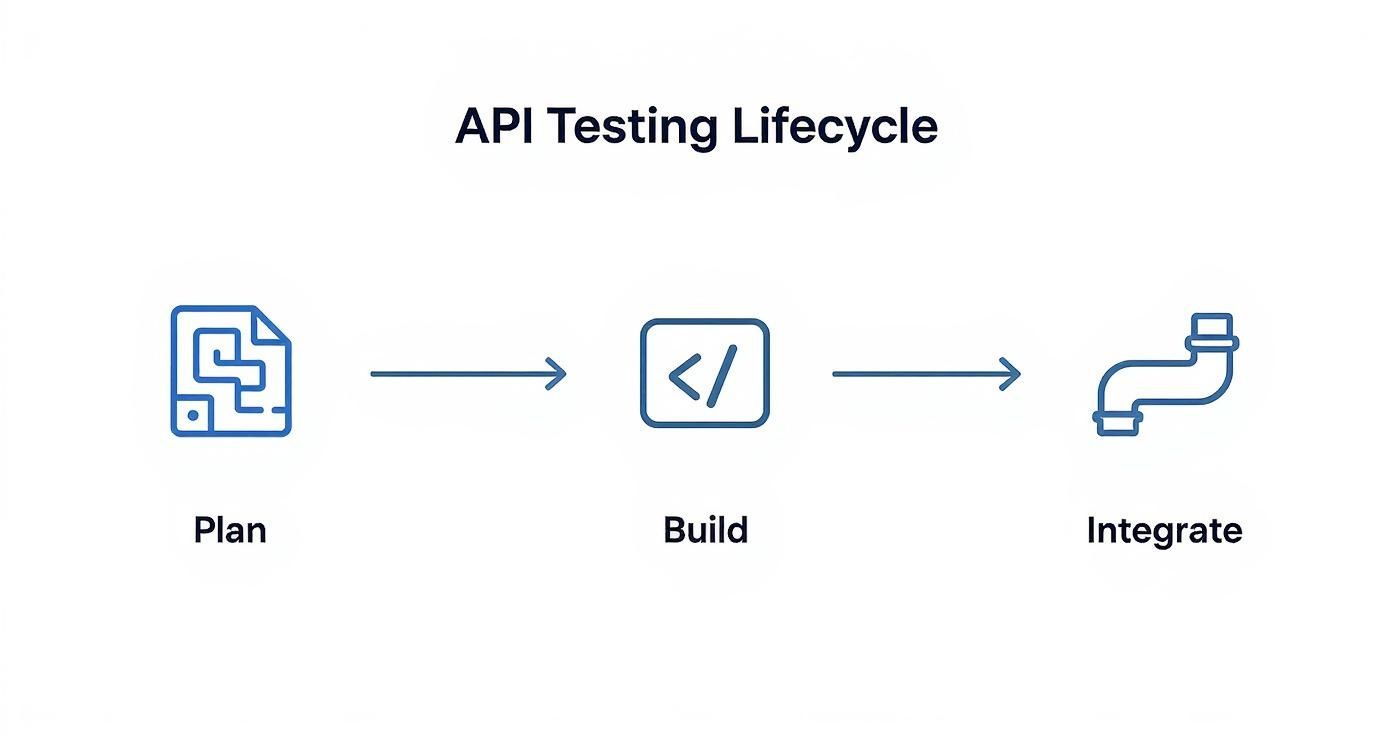
It’s a great visual reminder that a solid plan is the foundation you build everything else on. Without it, your test creation and automation efforts won't be nearly as effective.
From Manual Checks to Automated Test Suites

Most of us start our restful api testing journey with a bit of hands-on exploration. Before I even think about writing automation code, I like to get a real feel for the API. Tools like Postman are brilliant for this—they give you a simple interface to poke and prod the endpoints.
This isn't just about mindlessly clicking "Send." It's your first real reconnaissance mission. You can quickly fire off a GET request to see what a list of users looks like, a POST to create a new one, or a DELETE to clean up. As you inspect the responses, you're building a mental map of what the API does and how it behaves.
For instance, when you send a POST /users request with some valid JSON, you're not just looking for that magic 201 Created status code. You're also checking if the Location header points to the new resource you just made and verifying the response body actually includes the new user's ID. These small, manual discoveries are the seeds of your future automated tests.
Transitioning to Automated Scripts
That initial exploration is critical, but it’s not something you want to do over and over again. It just doesn't scale. The real game-changer is turning those manual steps into an automated test suite. This is how you build a safety net that catches bugs with every single code change.
Automating your tests gives you consistency and speed. You can run hundreds of checks in the time it would take to do a handful manually, which is absolutely essential if you want to integrate testing into a modern CI/CD pipeline.
Thankfully, great frameworks make this jump pretty painless. If you're in a Node.js world, a combination of a testing framework like Jest and an HTTP assertion library like Supertest is a proven and effective duo. For Python teams, Pytest with the Requests library offers a similarly powerful and clean setup.
The goal of automation isn’t just to run tests faster—it's to build confidence. A solid test suite becomes living documentation and a reliable gatekeeper, making sure regressions don’t sneak into production.
Crafting Meaningful Test Assertions
Writing good automated tests is about more than just sending a request and seeing if it blows up. The real value is in making specific, meaningful assertions about the response. A truly effective test needs to check a few key things.
Here’s what I always make sure a solid API test validates:
- Status Code Validation: The test has to confirm the HTTP status code is exactly what you expect. A successful creation should always return a
201, while asking for something that doesn't exist should consistently give you a404. - Response Body Validation: You need to dig into the JSON payload. This could be as simple as checking that a
user.idfield exists, or it could involve validating the entire response structure against a predefined schema to catch any unexpected API changes. - Header Verification: Don't forget the headers! They often contain crucial metadata. For example, your tests should probably check that the
Content-Typeisapplication/jsonor verify that any rate-limiting headers are present and have sensible values.
Speaking of status codes, you'll see the same ones pop up again and again. It’s worth getting familiar with the most common ones you'll need to assert against.
Common HTTP Status Codes and Their Meaning in Testing
This table is a quick cheat sheet for the status codes you'll encounter most often when writing API tests.
| Status Code | Meaning | When to Test For It |
|---|---|---|
| 200 OK | The request was successful. | GET a resource, PUT an update, DELETE a resource. |
| 201 Created | A new resource was successfully created. | POST to create a new item (e.g., a new user). |
| 204 No Content | The server processed the request but has no content to return. | A successful DELETE request often returns this. |
| 400 Bad Request | The server couldn't understand the request (e.g., invalid JSON). | Send a request with malformed data or missing required fields. |
| 401 Unauthorized | The request requires authentication, but none was provided. | Call a protected endpoint without an API key or token. |
| 403 Forbidden | The client is authenticated but not authorized to perform the action. | Try to access a resource with a valid but low-permission user. |
| 404 Not Found | The requested resource could not be found. | GET or DELETE an item using an ID that doesn't exist. |
| 500 Internal Server Error | A generic error indicating something went wrong on the server. | Although hard to trigger, it's a critical catch-all for unexpected failures. |
Understanding what these codes mean in the context of your API's behavior is fundamental to writing tests that are both precise and valuable.
Let’s pull this all together with a practical example using Jest and Supertest for a Node.js app. This test will create a new user and then run our key validations.
const request = require('supertest');
const app = require('../app'); // Your Express app
describe('POST /users', () => {
it('should create a new user and return 201', async () => {
const newUser = {
username: 'testuser',
email: '[email protected]'
};
const response = await request(app)
  .post('/users')
  .send(newUser);

// 1. Check the status code
expect(response.statusCode).toBe(201);

// 2. Check the response body for key properties
expect(response.body).toHaveProperty('id');
expect(response.body.username).toBe(newUser.username);

// 3. Check for an important header
expect(response.headers['content-type']).toMatch(/json/);
});
});
See how this little script perfectly mirrors a manual check? By building out a whole suite of these, you create a powerful validation layer that evolves with your application. It’s what keeps your API reliable and frees your team up to focus on building great new features.
Isolating Tests with Mocking and Virtualization

For your restful api testing suite to be effective, it needs to be fast, reliable, and completely independent. I've seen it time and again: tests that rely on live, external services become a huge source of frustration. They’re brittle. They fail when a third-party API is slow, down for maintenance, or just returns some weird, unexpected data.
This introduces a ton of noise and makes it impossible to know if a failure is your fault or someone else's. It's a problem that API mocking solves beautifully, and honestly, it’s a non-negotiable part of any serious testing strategy today.
Mocking is simply the practice of creating a simulated, stand-in version of an external API that you have total control over. It pretends to be the real dependency, letting your application interact with it just as it would with the genuine service.
Why API Mocking Is a Game-Changer
When you decouple your tests from external dependencies, you suddenly have complete command over your testing environment. Your tests can run anywhere, at any time, without needing a live internet connection or begging for access to a partner's staging server. This kind of isolation is what lets you build a truly fast and deterministic CI/CD pipeline.
But the real magic of mocking is its power to simulate scenarios that are a nightmare to reproduce with live services. You get to dictate the exact responses your application receives. This lets you hammer on your error-handling logic and build real resilience.
Think about all the conditions you can now easily test:
- Success Scenarios: The standard
200 OKwith a perfectly formed payload. - Client-Side Errors: A
404 Not Foundwhen a user looks for a non-existent resource or a400 Bad Requestwhen the input is garbage. - Server-Side Failures: A dreaded
500 Internal Server Errorto see if your app gracefully handles a backend meltdown. - Network Gremlins: Painfully slow response times or total connection timeouts to check your app’s patience.
The real power of mocking isn't just faking success; it's about simulating failure on demand. A test suite that only covers the "happy path" leaves your application vulnerable to the chaos of real-world network conditions and service outages.
Simulating Scenarios with Mock Servers
Tools like DotMock take the pain out of this process. Instead of getting bogged down writing custom code for a mock server, you can define your mock endpoints through a clean UI. You just specify the exact status code, headers, and body you want for any given request.
Your tests become completely predictable and repeatable. You can write an assertion that specifically checks how your app behaves when a payment gateway returns a 503 Service Unavailable error. You can run that test a thousand times and know your error handling works, every single time.
While mocking usually focuses on faking specific API endpoints, a broader approach is service virtualization, which can simulate entire backend systems. This is incredibly useful for allowing frontend and backend teams to work in parallel without waiting on each other, which can obliterate development bottlenecks. You can learn more about what is service virtualization in our detailed guide on the topic.
Weaving Your API Tests into the CI/CD Pipeline

An automated test suite is a great start, but it really comes alive when it’s running on its own, protecting your codebase 24/7. When you plug your restful api testing suite into a Continuous Integration/Continuous Delivery (CI/CD) pipeline, it stops being something you have to remember to run and becomes an active gatekeeper for quality. This is how your tests become a fundamental part of your development workflow, not just an afterthought.
The whole point is to have your API tests fire automatically every time a developer pushes a code change. If the tests all pass, the code is good to go. If even one test fails, the build stops in its tracks, and the team gets an immediate heads-up.
Setting Up the Pipeline Configuration
Modern tools like GitHub Actions or GitLab CI/CD have made this incredibly easy. You just need a simple YAML file in your repository that lays out the steps for the pipeline to follow.
A typical testing job in one of these CI/CD configuration files usually involves a few key parts:
- The Trigger: This defines when the job runs. A common setup is to trigger it
on: pushfor yourmainordevelopbranch. This way, every single change gets a shakedown. - Environment Setup: First, the pipeline needs to check out the code and get the right environment ready, like installing a specific version of Node.js or Python.
- Installing Dependencies: Next, it will run familiar commands like
npm installorpip install -r requirements.txtto pull in all the packages your test suite depends on. - Running the Tests: This is the moment of truth. The pipeline executes the command that kicks off your tests, something like
npm test.
The biggest win with CI/CD integration is the rapid feedback. Instead of finding out about a regression hours or even days later, a failed build tells you about a problem within minutes of the code being pushed. This tight feedback loop makes tracking down and fixing bugs so much easier.
Handling Secrets and Sending Alerts
A real-world pipeline has to deal with sensitive information. You should never, ever hardcode API keys, tokens, or database passwords directly into your configuration files. Instead, use the secrets management features built right into your CI/CD platform. You add these variables through the platform's UI, and they get securely injected into the pipeline when it runs.
This keeps your credentials out of your repository while still letting your tests authenticate with protected endpoints. It's also a great idea to set up automatic notifications for failures. A quick message posted to a team's Slack or Microsoft Teams channel when a build breaks ensures the right people see the problem right away, so broken code doesn't just sit there.
The explosive growth in CI/CD is a huge driver behind the API testing market, which was valued at USD 1.36 billion and is expected to reach USD 6.05 billion. As more teams adopt agile methods, these automated quality checks become non-negotiable for shipping code quickly without breaking things. You can see more details about this trend in the API testing market growth report on maximizemarketresearch.com.
If you want to go deeper on structuring your workflow, take a look at our guide on continuous integration best practices. It’s packed with practical strategies for building a pipeline that’s both tough and efficient.
Finding Vulnerabilities with API Security Testing
Having an API that works correctly and performs well is great, but that's really only half the job. All that effort can be undone in an instant by a single security flaw, turning your fantastic tool into a massive liability. This is precisely why any solid restful api testing plan has to go beyond simply making sure things work; it needs to actively hunt for vulnerabilities.
This means putting on a different hat. You’re no longer just confirming that a GET request returns the right data. Instead, you're trying to coax the API into giving up data it shouldn't. You're intentionally looking for weak points, trying to trick the system into behaving in insecure ways. It's this proactive, almost adversarial, approach that builds truly resilient APIs.
Probing for Common Weaknesses
From what I’ve seen, some of the most damaging API vulnerabilities come from two places: sloppy authorization and flimsy input validation. Your security tests should make finding these a top priority—long before an attacker does.
- Broken Object Level Authorization (BOLA): This is, without a doubt, one of the most common and dangerous flaws out there. The classic test is simple: can a user logged in as "User A" just tweak an ID in the URL (like changing
/api/orders/123to/api/orders/456) and suddenly see data belonging to "User B"? Your tests must cover these scenarios explicitly. Authenticate as one user, then hammer on the endpoints belonging to another. - Injection Flaws: What happens when you send junk data? Can you throw the backend for a loop by sending a string where it expects a number, or by nesting JSON objects a dozen levels deep? These kinds of tests are crucial for making sure your API is sanitizing every piece of incoming data.
- Weak Authentication: You have to actively test your auth mechanisms. What response do you get when you send a request with a missing token? What about an expired one? Or one that’s been tampered with? The API should consistently return a 401 Unauthorized or 403 Forbidden. No exceptions.
Security isn't a feature you just bolt on at the end. It’s a practice that has to be woven into the entire development process. When your team adopts a "security-first" mindset, you catch these problems early, which is always cheaper and easier.
The demand for these skills and tools is exploding as cyber threats become more sophisticated. The API security testing tools market was valued at USD 1.09 billion and is on track to hit an incredible USD 9.66 billion. You can get more insights on this trend over at fortunebusinessinsights.com.
At this point, integrating automated security scanning tools into your CI/CD pipeline isn't just a good idea—it's essential. For a much deeper look into specific tactics, check out our guide on API security testing.
Answering Common RESTful API Testing Questions
As you get more serious about API quality, a few questions always seem to pop up. Sorting these out early on helps get the whole team on the same page and makes the entire testing process run a lot smoother.
Let's break down some of the most common ones I hear.
API Testing vs. UI Testing: What’s the Real Difference?
It's easy to get these two confused, but the distinction is pretty simple. It all comes down to which layer of the application you're testing.
API testing hits the business logic layer directly. You're making calls straight to the endpoints to check if the core logic, data handling, and integrations are solid—all without ever loading a webpage. This makes your tests incredibly fast and much less brittle than UI tests.
UI testing, on the other hand, deals with the presentation layer. It’s all about what the user actually sees and clicks on. You're making sure buttons work, forms submit correctly, and the user experience is what it should be.
Think of it this way: API testing is like checking the engine and transmission of a car, while UI testing is making sure the steering wheel, pedals, and dashboard all work for the driver.
Which Tools Are Best for Beginners?
If you're just dipping your toes in, diving headfirst into a complex coding framework is a recipe for frustration. That's why I always recommend starting with a tool that has a great graphical user interface.
Postman and Insomnia are the undisputed champions here. They give you a visual way to build and send API requests, poke around the responses, and really understand how an API behaves. You can do all of this without writing a single line of code.
Once you’ve got the hang of the basics, you can start exploring their built-in scripting features to automate some simple checks. When you're ready for more control, you can graduate to powerful code-based libraries like Supertest for JavaScript, REST Assured for Java, or Pytest with the Requests library for Python.
How Should I Handle Authentication in My Tests?
This is a big one. The last thing you want is for every single test to fail just because your auth token expired.
A solid, battle-tested approach is to have a dedicated setup step or a reusable function that handles authentication. Before your test suite runs, this function calls the login endpoint to grab an auth token (like a JWT).
You then save that token to a variable and inject it into the Authorization header for every subsequent API call that needs it. Don't stop there, though. A truly robust test suite will also validate your authorization rules. For instance, you should absolutely have a test that confirms a regular user gets a 403 Forbidden error when they try to hit an admin-only endpoint.
Ready to build faster, more reliable tests? With DotMock, you can create mock APIs in seconds to simulate any success or failure scenario, from 500 errors to network timeouts. Stop waiting on dependencies and start shipping with confidence. Create your first mock API for free at dotmock.com.