

When it comes to generating test data, you’ve got a few solid options. You can whip up some synthetic data with scripts, seed a database for a more persistent state, or even capture and anonymize live user traffic for the ultimate in realism. The right choice really boils down to what you're trying to achieve—are you after quick, disposable data for a few unit tests, or do you need high-fidelity data to hunt down those tricky production-level bugs?
Why Realistic Test Data Is Your Best Defense

Let’s skip the lecture on why testing is important. We all know that. The real headache for most developers is the huge gap between our clean, predictable testing environments and the messy, chaotic reality of production.
Good testing is about more than just code coverage; it’s about data coverage. If your tests are only running against simple, predictable data, you're just validating the "happy path"—the one perfect scenario where a user does everything exactly right. That’s not real life.
This is where applications get fragile. What happens when a user pastes an emoji into a username field? How does your API react to a mangled JSON payload or a sudden null value where it expected a string? These are the edge cases that basic, "happy path" data will never find, leaving you with nasty surprises that only pop up after you've shipped.
Bridging the Gap Between Test and Production
The aim here is to create test data that truly reflects the complexity and randomness of the real world. Now, this doesn't mean you have to clone your entire production database every time you want to run a test. That's often slow, expensive, and a major privacy headache. It's about picking the right tool for the specific job at hand.
Getting strategic with your data generation pays off, big time. According to Fortune Business Insights, modern test data management helps companies trim 5-10% from their software testing costs and can boost test coverage by as much as 30%. You can dig deeper into the impact of test data management on the industry to see the full picture.
Here's the bottom line: The resilience of your application is directly tied to the quality and realism of your test data. Bad data makes for brittle code. Realistic data builds confidence and lets you ship with peace of mind.
This guide is your toolkit for building robust, reliable applications by mastering different data generation methods. We'll cover everything from simple scripts to advanced traffic capture, giving you the practical know-how to shrink the gap between your dev environment and what your users actually experience.
Crafting Synthetic Data with Scripts and Libraries
When you need test data on the fly, writing a bit of code is often the most direct route. It puts you in the driver's seat, giving you absolute control over the data's shape and content. This is a core skill for any developer or QA engineer. Forget manually plugging in "test user" and "[email protected]"; you can script the creation of vast, realistic datasets in minutes.
This is where data-generation libraries really shine. If you're in the Node.js world, Faker.js is probably your best friend. For Python folks, the Faker library serves the same purpose. These aren't just random string generators—they're packed with modules to create believable data, from names and addresses to company slogans and product descriptions.
This approach is perfect for unit tests. You can generate the precise data needed to isolate a function, run the test, and then just throw the data away. It’s clean, fast, and efficient.

Using Faker for Realistic Data Points
The magic of a library like Faker is its knack for producing data that feels real. This is huge for catching subtle bugs in your validation and formatting logic. Instead of just testing with generic placeholders, you’re using data that closely resembles what your application will handle in the wild.
Think about a simple user registration form. Sure, you could test it with a couple of hand-typed users. Or, you could let a script whip up hundreds of unique, diverse profiles in the blink of an eye. The difference in test coverage is massive.
With Faker, you can generate everything from internet-specific data like IP addresses and user agents to financial details like transaction types and BIC codes. This range lets you build incredibly thorough test cases that cover a huge spectrum of user inputs and scenarios.
Building Data Factories for Complex Objects
Generating a single data point is one thing, but most APIs today work with complex, nested JSON objects. This is where you bring in the "factory" pattern. A factory is essentially a function or class that uses a library like Faker to build a complete object, perfectly matching the schema your API is expecting.
For instance, let’s say your application needs a user object that contains a nested profile and an array of posts. A factory function makes this trivial:
- It starts by generating the top-level
userobject with a UUID, email, and password. - Next, it creates the nested
profileobject, populating it with a first name, last name, and avatar URL. - Finally, it generates a list of
postobjects, each with its own unique title, body, and publication date.
This pattern is a game-changer because it's both reusable and scalable. Once a factory is defined for a data model, you can spin up one, ten, or a thousand distinct instances with a single function call. You can explore different ways to generate mock data for your tests to see what fits your project best.
By pairing data-generation libraries with the factory pattern, you graduate from testing with static, boring data to using dynamic, realistic datasets. This is how you find those tricky bugs that only show up when weird or unexpected data combinations occur.
At the end of the day, scripting your test data generation gives you a powerful and flexible foundation for any testing strategy. It’s how you ensure your application is truly ready for the messy, unpredictable data it will face in the real world.
Setting the Stage: Populating Your Database with Seeding Strategies
Synthetic data scripts are great for quick, isolated tests, but what about when your tests need a database that sticks around? For anything beyond a simple unit test, especially for integration and end-to-end testing, you need a stable, predictable database state. This is where database seeding comes in.
Seeding is the process of loading your database with a specific, predefined set of data before your tests run. Think of it as setting the stage before a play. Instead of starting with an empty, unknown environment, you ensure every piece of data is exactly where it needs to be. This simple practice is a lifesaver for stamping out flaky tests that fail for seemingly random reasons, saving your team from hours of frustrating debugging.
Leaning on Your ORM for Seeding
Most of us are already using an Object-Relational Mapper (ORM) like Prisma or SQLAlchemy to talk to our databases. Good news—these tools are perfect for handling your seeding process. You can write your seed scripts in the same language as your application, which means no context switching to raw SQL and everything stays consistent and type-safe.
The basic idea is to write a script that uses your ORM’s client to create records. A classic pattern is to generate a few users first, then create posts tied to those users, and finally add comments linked to both. This approach naturally handles all the relational dependencies, like foreign keys, right from the get-go.
Here’s a quick look at a Prisma seed script that creates a user and a post together.
See how it creates interconnected records in one go? This is exactly why using an ORM for seeding is so effective—it guarantees your data maintains its referential integrity from the start.
A well-structured seed script is more than just a setup tool; it's a form of living documentation. It clearly shows the data relationships and states your application expects, which is a massive help for new developers trying to get up to speed.
One Size Doesn't Fit All: Organizing Seeds for Different Scenarios
You won't always need a database loaded with every possible data permutation. Sometimes you need it completely empty, and other times you need a very specific user setup. A smart move is to create separate seed files for different testing scenarios, giving you precise control over your test environment.
Try organizing your seeds into different files or profiles. For example, you could have:
empty_state.js: A script that just wipes the database clean. It’s perfect for tests that check how the app behaves on first launch or how empty-state UI components look.basic_user.js: Populates the database with a single, standard user account. This is your go-to for testing common user flows without any extra noise.premium_account.js: Creates a user with an active subscription or elevated permissions. This lets you test feature flagging, paywalls, and access control logic.complex_permissions.js: Sets up a more involved scenario with multiple users, different roles, and shared resources to test sophisticated authorization rules.
By breaking up your seeds like this, you can run only the data setup you need for a specific test. Your tests become faster, more focused, and you can generate test data for any scenario with a single command.
Using Real Traffic to Find Hidden Bugs
While scripts and database seeding give you a ton of control, they have one major drawback: they’re based on your assumptions about how people use your app. To find those truly nasty, elusive bugs—the ones that only pop up in production—you need data that captures the messy, unpredictable nature of real-world user interactions.
This is where tapping into live traffic becomes a game-changer. The basic idea is often called traffic shadowing or traffic capture. You record actual requests hitting your production or staging servers and then replay them in a safe test environment. This gives you a level of realism that’s impossible to create by hand, uncovering weird edge cases you’d never dream of testing.
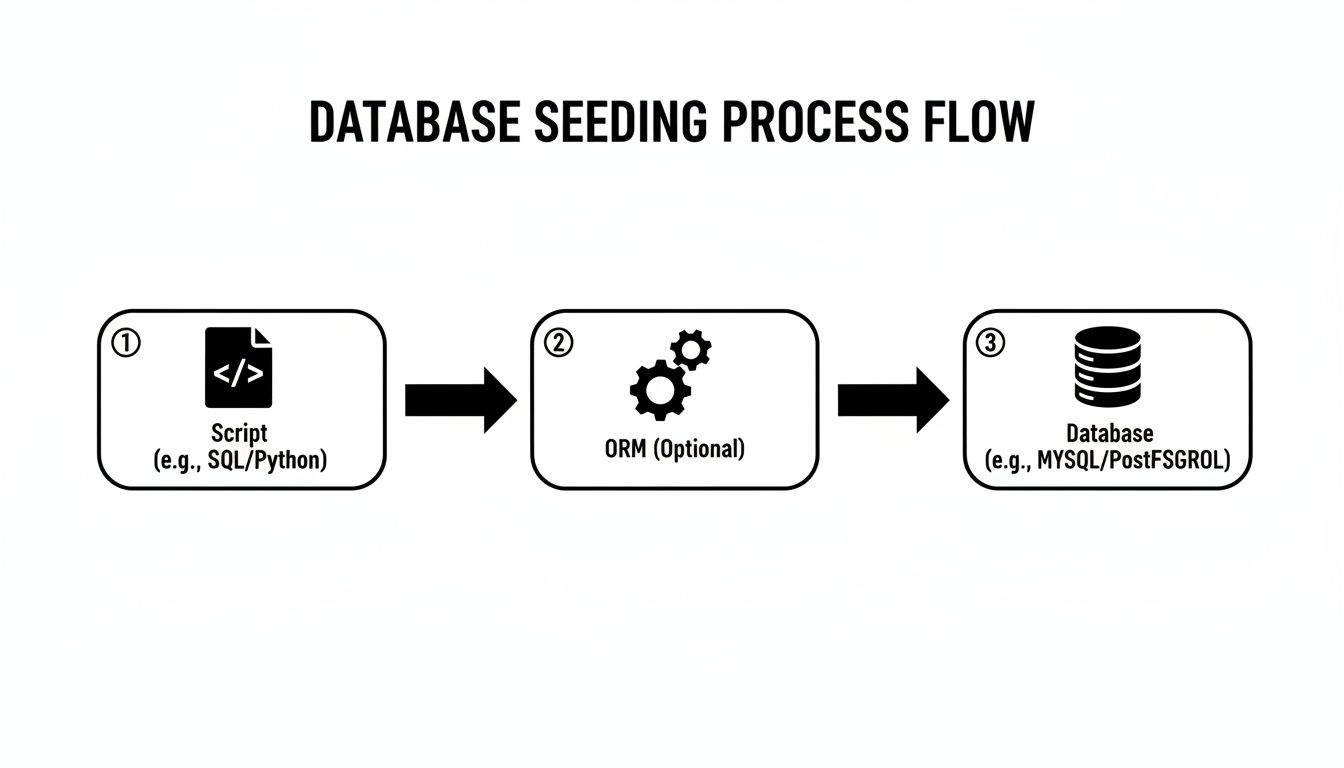
While the diagram above shows a more foundational, code-driven approach with database seeding, capturing live traffic takes this concept of realism to a whole new level.
The Critical Step: Data Anonymization
Before you even think about replaying production traffic, there’s one step you absolutely cannot skip: anonymization. Using raw user data is a massive privacy and security breach, not to mention a quick way to violate regulations like GDPR. You have to scrub every piece of Personally Identifiable Information (PII) and other sensitive data from the captured requests.
The goal is to keep the structure and shape of the real requests—the endpoints they hit, the parameters they use—while swapping out all sensitive values for safe, fake ones. This gives you the best of both worlds: production-like scenarios without the compliance nightmare.
Your anonymization process needs to be airtight. Make sure you're scrubbing these things from both request headers and bodies:
- Personally Identifiable Information (PII): Names, emails, phone numbers, home addresses.
- Authentication Data: API keys, session cookies, JWTs, and any authorization tokens.
- Financial Details: Credit card numbers, bank accounts, or specific transaction data.
- Health Information: Anything that could be considered protected health information.
Getting this wrong can lead to serious legal and financial trouble, so make sure this process is automated and bulletproof.
Replaying Traffic for High-Fidelity Testing
Once your traffic is safely anonymized, you can start replaying it against your test environment. This is where the magic happens. Suddenly, you can test a new feature not just with a dozen handcrafted scenarios, but with a stream of thousands of realistic, anonymized user requests.
This is how you find out how your code really handles things like malformed JSON, unexpected query parameters, or bizarre user agent strings that you'd never think to test.
According to the 2025 State of Testing Report from PractiTest, 34.7% of teams say that getting more realistic test data is a key benefit they’re seeing from adopting more advanced testing techniques. This push for realism is a huge trend in modern QA.
Thankfully, you don't have to build this entire pipeline from scratch. Many tools now offer built-in features that handle this for you. For example, some mock API platforms have traffic capture capabilities that simplify the entire record-and-replay process. By folding these methods into your workflow, you can generate test data that truly mirrors production, giving you the confidence that your application is ready for whatever your users throw at it.
Automating Data Generation in Your CI/CD Pipeline
Let's be honest: generating test data manually is a major bottleneck. If you want a development workflow that’s actually efficient, data generation needs to become an automated, invisible part of your process. The best way to do that? Integrate it directly into your Continuous Integration and Continuous Deployment (CI/CD) pipeline.
This is how you finally kill the dreaded "it works on my machine" problem. By automating the setup, every developer and every test run starts from the exact same data baseline. Suddenly, your test results are reliable and completely reproducible—the cornerstone of any team that wants to ship high-quality code, fast.
Triggering Data Generation with Pipeline Jobs
Modern CI/CD platforms like GitHub Actions or GitLab CI make this surprisingly easy. You can configure your pipeline to run data generation scripts as one of the first steps, right before your test suite kicks off. This ensures a clean, predictable environment for every single run.
Think of it in practical terms. You can set up a dedicated job that runs just after your application builds:
- For integration tests: The pipeline can execute your database seeding script to populate a fresh test database with a known set of users, products, or specific permissions.
- For unit tests: A different step might run a script to generate test data into mock JSON or CSV files that your tests read from.
This screenshot of a GitHub Actions workflow shows just how you can chain these steps together. You can slot your data generation tasks in exactly where they need to go.
The mindset shift is simple but powerful: treat your test data setup just like any other automated step in your build process. It stops being a manual chore and becomes a guaranteed, repeatable part of shipping software.
This isn't just a nice-to-have anymore. In today's DevOps world, 68% of organizations are already using generative AI for test automation, and a whopping 72% report that it makes their processes faster. This trend is particularly strong in demanding sectors like finance. You can dig into more stats about the rise of AI in test automation on testgrid.io.
Using Mock APIs in Your CI Environment
Automating your data also elegantly solves the challenge of testing against external services. Instead of hitting live third-party APIs during a CI run—which is often slow, flaky, and can even cost you money—you can spin up a mock API service right in your pipeline.
This keeps your entire test suite self-contained and deterministic. A dedicated mock API can simulate any scenario you can dream up, from perfect responses to network timeouts and 500 errors. It gives you total control to test how resilient your application truly is. If you want to go deeper on this, exploring some continuous integration best practices can offer more solid guidance for building out your pipelines.
Got Questions About Test Data? We've Got Answers.
Even the best-laid plans run into hiccups. When it comes to generating test data, a few common questions pop up time and time again. Let’s walk through them so you can get back to building, not debugging your test setup.
How Much Test Data Do I Really Need?
This is the classic "how long is a piece of string" question. The honest answer? It depends entirely on what you're trying to prove with your test. A million records to check a login form is overkill.
Forget about sheer volume for a moment and think in terms of coverage and scenarios. The better question to ask is: "Have I covered the most critical user flows, weird edge cases, and likely failure points?"
- Unit Tests: You just need enough data to exercise a single function's logic. Think a handful of distinct objects, max.
- Integration Tests: This is where relationships matter. You'll need a bit more here—maybe a few realistic user accounts with all their related data, like posts, comments, and permissions.
- Performance Tests: Now we're talking volume. To simulate a real production load, you might need thousands or even millions of records to see how things hold up under pressure.
The right amount of data is the absolute minimum you need to feel confident in your test results. Start small. You can always add more complexity later if a specific scenario calls for it. Piling on unnecessary data just makes your test suite slow and brittle.
Synthetic Data vs. Anonymized Production Data: Which Is Better?
This is a big one. Should you create your data from scratch (synthetic) or use a scrubbed copy of the real thing (anonymized)? There’s no single right answer; they’re two different tools for two different jobs.
| Feature | Synthetic Data | Anonymized Production Data |
|---|---|---|
| Realism | Pretty good, but it's based on your assumptions. | As real as it gets. Captures true user behavior. |
| Privacy | Totally safe. It was never real to begin with. | Requires a rock-solid, audited anonymization process. |
| Edge Cases | Perfect for creating specific, hard-to-find scenarios. | Only contains oddities that have actually occurred. |
| Setup Cost | More upfront work to write the generation scripts. | Can be quick if you have good tooling in place. |
You'll want to use synthetic data when you need to test very specific conditions, especially for new features that don't have any production data yet. It gives you surgical precision.
On the other hand, reach for anonymized production data when you need to find the "unknown unknowns." It helps you see how your system handles the messy, unpredictable nature of real-world use that you could never dream up yourself.
Should I Commit Test Data to My Git Repo?
I've seen this debate play out on so many teams, and the consensus is almost always a hard no. Please, don't commit large data files directly to your repository. It inflates the repo size for everyone, making cloning and pulling a sluggish nightmare.
The much cleaner, more professional approach is to commit the scripts that generate the data. This keeps your repository lean and mean.
- Commit your database seed scripts, not the
.sqldumps. - Commit your data factory files, not the massive JSON files they create.
- The only exception? Small, static mock files are usually fine. If you have a five-line JSON response for a specific unit test, go ahead and commit it.
By committing the code that creates the data, you get the best of all worlds: a reproducible, version-controlled, and efficient testing environment.
Ready to stop wrestling with test data and start shipping faster? DotMock lets you intercept real traffic to generate high-fidelity mock APIs or build them from scratch in seconds with AI. Eliminate dependencies, test every edge case, and accelerate your development cycle. Create your first mock API for free on dotmock.com.