
Think of API authentication like the security desk in your office building's lobby. Before anyone can get to the elevators, they need to show their ID badge. It's that first, essential step of proving they are who they say they are and that they belong there.
Without that check, anyone could just wander in and access sensitive areas. Your API is no different—it's the digital entryway to your application's data and features.
What Is API Authentication and Why Does It Matter?

At its heart, API authentication is all about identity verification. It's the process your API uses to confirm that a user, an application, or another service trying to connect is legitimate. This isn't just a technical nicety; it's your first and most critical line of defense.
Every time an application makes a request to your API, it's like someone walking up to that security desk. The request carries credentials—maybe an API key or a special token—which are the equivalent of an ID badge. Authentication is the process of checking that badge. If it's valid, the request is allowed through. If not, it's denied on the spot.
The Bedrock of Digital Trust
This verification process is the foundation of trust in any digital interaction. If you don't authenticate requests, you're essentially letting strangers roam your halls. You have no idea who is accessing your data, what they're doing, or if their intentions are malicious.
Putting proper authentication in place accomplishes a few key things:
- It protects your data. Only authorized users and applications can reach sensitive endpoints, keeping things like customer profiles and financial records safe.
- It gives you visibility and control. By identifying every requester, you can monitor API usage, spot unusual patterns, enforce rate limits to prevent abuse, and keep a solid audit trail.
- It enables a better user experience. Authentication is what allows you to personalize responses and manage permissions for different users or subscription tiers.
API authentication isn’t just about keeping bad actors out. It’s about creating a secure, controlled, and reliable channel for communication, turning a vulnerable endpoint into a protected resource.
The High Stakes of Getting It Wrong
The consequences of weak or missing authentication can be devastating. As APIs have become the connective tissue of modern software, they've also become a massive target for attackers. The global API Management market is expected to explode from USD 6.63 billion to over USD 51.11 billion by 2033, a surge driven largely by the growing need for better security. You can dig deeper into these trends with this detailed API market analysis.
Getting this wrong can lead to crippling data breaches, service abuse that runs up your costs, and a serious blow to your company's reputation. For any developer building software today, strong authentication isn't optional—it's a fundamental requirement.
Comparing Common API Authentication Methods
Choosing the right way to secure your API is a lot like picking the right lock for a door. You wouldn't use a simple padlock to guard a bank vault, and you wouldn't install a complex biometric scanner on a garden shed. Each authentication method strikes a different balance between simplicity, security, and flexibility, and each is designed for a specific job.
Let's walk through the most common approaches you'll encounter. We'll use some real-world analogies to get a feel for how they work, when you should use them, and what trade-offs you’re making with each.
API Keys: The Library Card
The most straightforward method is the API Key. Think of it as your library card: it identifies you as a valid library member, but it doesn't prove who you are on any given visit. It's just a unique string of characters that tells the API, "this request is coming from a recognized application."
Implementation is dead simple. The client application just tucks the key into an HTTP header (like X-API-Key) or a query parameter. On the other end, the server just has to check if the key is on its list of valid keys.
- When to Use It: This approach is perfect for public, low-risk data. Think weather APIs, map services, or public data feeds where the main goal is just to track usage, gather analytics, or enforce basic rate limits.
- The Catch: API keys are static. If one gets exposed—maybe a developer accidentally commits it to a public GitHub repo—it's a live key until someone manually revokes it. That can open up a serious security hole.
Basic Authentication: The ID Check
Basic Authentication is the next step up, designed to identify a specific user. It’s like showing your driver's license to a bouncer every single time you enter the club. The client sends a username and password with every API request, packaged together in the Authorization header after being Base64-encoded.
And that word "encoded" is critical. Base64 isn't encryption; it’s just a way to package the text, and anyone can easily reverse it. This means Basic Auth is only as secure as the connection it's on, making HTTPS an absolute must.
Basic Auth is simple, but it has a major drawback: it sends user credentials over the wire with every single request. That constant exposure dramatically increases the risk if your transport-layer security (TLS/SSL) isn't rock-solid.
OAuth 2.0: The Valet Key
Now for the big one. OAuth 2.0 isn't really an authentication method—it's an authorization framework. The best analogy is a valet key for your car. You don’t hand the valet your master key that opens the trunk and glove box. You give them a special key with limited permissions: just enough to start the car and park it.
OAuth 2.0 lets a user grant a third-party app limited access to their data on another service without ever sharing their password. The "Sign in with Google" button is the classic example. You're telling Google it's okay for, say, a project management app to see your name and email, but you are absolutely not giving that app your Google password. It’s all about delegated, fine-grained access.
- The Key Players in an OAuth 2.0 Flow:
- Resource Owner: The end-user who owns the data.
- Client: The third-party app requesting access.
- Authorization Server: The server that authenticates the user and hands out the access tokens (the "valet keys").
- Resource Server: The API where the protected data actually lives.
This framework is the undisputed standard for any application where users need to grant services access to their accounts. It's more complex to set up, but the security and control it offers are unmatched.
JWT: The Verifiable Passport
A JSON Web Token (JWT) is a clever way to pass around user information securely. Think of it as a modern passport. It contains verified information about who you are (the payload), it's issued by a trusted authority (the signature), and border agents can check its validity without having to call the passport office every time.
A JWT is just a long string, but it has three distinct parts separated by dots:
- Header: A little bit of metadata, like what algorithm was used to sign it.
- Payload: The actual data, or "claims," about the user (e.g., user ID, roles, expiration time).
- Signature: This is the magic. It’s a cryptographic signature that proves the token is authentic and hasn't been messed with.
JWTs are frequently used as the format for the access tokens in an OAuth 2.0 flow. Their superpower is that they are stateless. A server doesn't need to keep a record of active sessions; it can validate a JWT just by checking its signature. This makes them perfect for modern, distributed systems like microservices. This kind of scalability is a huge reason why the API management market is expected to rocket from USD 5.76 billion to nearly USD 50 billion by 2032, as businesses demand robust security that works everywhere. You can dive deeper into these API management statistics here.
API Authentication Methods at a Glance
So, how do you choose? It really boils down to your specific needs for security, user experience, and architecture. Here’s a quick-reference table to help you compare these methods side-by-side.
| Method | Best For | Security Level | Statefulness | Complexity |
|---|---|---|---|---|
| API Keys | Identifying apps for analytics and rate limiting. | Low | Stateless | Very Low |
| Basic Auth | Simple, internal, server-to-server traffic over HTTPS. | Low-Medium | Stateless | Low |
| OAuth 2.0 | Delegated third-party access and user-centric authorization. | High | Stateful/Stateless | High |
| JWTs | Scalable, stateless user authentication in modern apps. | High | Stateless | Medium |
Ultimately, understanding the trade-offs is the key to building a secure API. If you just need to track usage on a public data feed, an API key is probably fine. But the moment you're dealing with actual user data, a battle-tested framework like OAuth 2.0—often using JWTs for its tokens—is the industry standard for very good reasons.
A Deep Dive into OAuth 2.0 and JWTs
When you start dealing with user data or letting third-party apps connect, you need something much stronger than simple keys or credentials. This is where OAuth 2.0 and JSON Web Tokens (JWTs) come in. They’re the modern backbone of secure authentication in API design, working together to manage access in a way that's secure, flexible, and scalable.
Let’s talk about OAuth 2.0 first. It's crucial to understand that it’s an authorization framework, not strictly an authentication protocol. Its main job is to let an application access a user's data on another service without ever handling their password. The classic example is seeing a "Sign in with Google" button on a new app you're trying out.
When you click that button, you aren't handing your Google password over to the new app. Instead, you're sent to Google to prove who you are. Once you do, you grant the app specific permissions—maybe just to see your name and email. Google then gives the app a temporary "access token," which is like a limited-use valet key that only unlocks the specific resources you approved.
The Key Players in the OAuth 2.0 Dance
To really get how this works, you need to know the four main roles in this carefully choreographed process:
- Resource Owner: That’s you, the end-user. You own the data and have the final say on who gets to access it.
- Client: This is the third-party application (like that new project management tool) that wants to access your data.
- Authorization Server: Think of this as the gatekeeper (e.g., Google). It handles authenticating you and issuing access tokens after you give your consent.
- Resource Server: This is the API where your data actually lives (like Google's user profile API). It's built to trust the tokens issued by the Authorization Server.
This clear separation of roles is what makes OAuth 2.0 so powerful. It creates a chain of trust where your actual credentials are never exposed to the client application, which dramatically reduces the potential for a security breach.
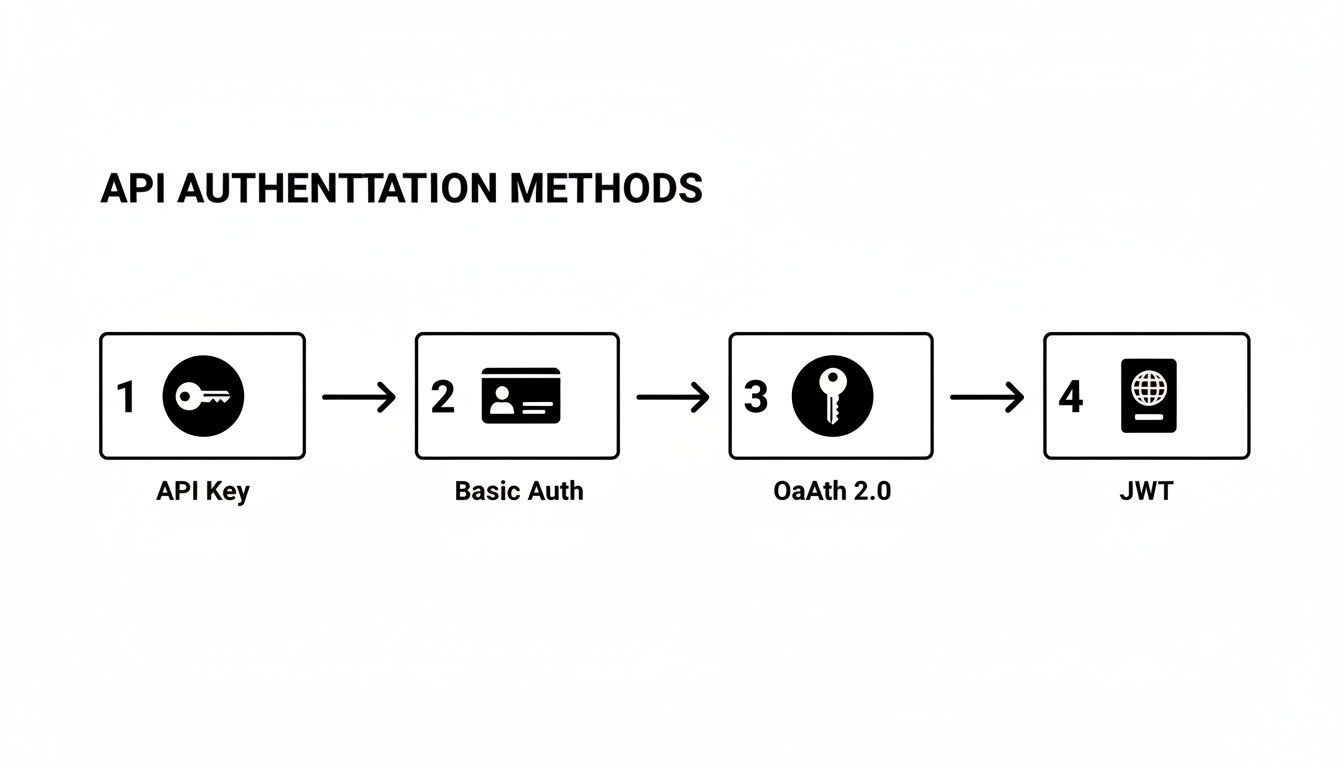
As this image shows, there’s a clear progression from simple methods to more advanced frameworks. We’re now at the top of that ladder, where robust solutions like OAuth 2.0 and JWTs are essential for any application that handles user data.
Dissecting the JSON Web Token (JWT)
So, what exactly is that access token the Authorization Server hands out? In most modern systems, it’s a JWT. A JSON Web Token is a compact, self-contained way for two parties to securely send information as a JSON object. The best analogy is a digital passport.
It’s "self-contained" because everything needed to verify the user and their permissions is right inside the token itself. A JWT is made of three parts, separated by dots:
- Header: This contains metadata about the token, like its type (
JWT) and the signing algorithm used (e.g., HMAC SHA256 or RSA). - Payload: This section holds the "claims," which are statements about the user and other useful data. Common claims include the user's ID, their role, and, importantly, when the token expires.
- Signature: This is the security cornerstone. To create it, you take the encoded header and payload, combine them with a secret key, and sign the whole thing with the algorithm from the header. This signature guarantees the token hasn't been messed with.
The real magic of a JWT is its stateless nature. When a server gets a JWT, it doesn't have to hit a database to look up a user's session. It can verify the token's authenticity just by checking the signature. This makes JWTs incredibly efficient and scalable, especially for microservices.
How OAuth 2.0 and JWTs Work Together
This is a common point of confusion, so it’s worth repeating: OAuth 2.0 is the framework, and JWT is the token format. They aren't competing technologies; they're partners that complement each other perfectly to secure your API.
Here’s how they team up in a typical flow:
- A user wants to log in to an app using "Sign in with Google."
- The app redirects the user to Google’s Authorization Server (the OAuth 2.0 flow has now begun).
- The user logs into their Google account and grants the app permission.
- The Authorization Server generates an access token formatted as a JWT.
- This JWT is sent back to the application.
- The application then includes this JWT in the
Authorizationheader of every API call it makes to the protected Resource Server. - The API checks the JWT's signature and its claims (like the expiration date) before deciding whether to grant or deny access.
By combining the delegated authorization of OAuth 2.0 with the secure, stateless token format of JWTs, you get a highly secure and efficient solution for modern authentication in API development. This powerful duo is the industry standard for protecting user-centric APIs.
Putting API Security Best Practices Into Action

Knowing the different ways to authenticate an API is one thing, but building a genuinely secure system requires a totally different mindset. You have to think defensively. It’s not enough to know how authentication is supposed to work; you need to anticipate all the ways it can break.
This shift from theory to practice is all about building layers of protection. Assume that threats aren't just a possibility—they're a probability. You have to guard every step of the process, from the moment a user types in their password to the validation of every single API call that follows. Without that level of vigilance, even the smartest system can fall victim to a simple oversight.
Hardening Your API Against Common Attacks
An attacker is always looking for the weakest link in the chain. Let's walk through some of the most common threats and the practical, must-have best practices you can use to shut them down.
Credential Stuffing and Brute-Force Attacks
For an attacker, this is a pure numbers game. They get their hands on massive lists of stolen credentials from other data breaches and use bots to hit your login endpoints over and over, hoping for a match. Brute-force attacks are a close cousin, where they just relentlessly guess passwords for a known username.
- Implement Rate Limiting: This is your first line of defense. Set a strict limit on how many login attempts can come from a single IP address or be made against a single account in a short period. For instance, you could lock an account for 15 minutes after five failed tries. It’s a simple move that makes automated attacks incredibly slow and basically useless.
- Enforce Strong Password Policies: Don't just ask for a mix of uppercase, lowercase, numbers, and symbols. Go a step further and check new passwords against databases of known compromised passwords. This stops users from picking credentials that are already floating around on the dark web.
Token Leakage and Interception
Think of access tokens as the keys to the kingdom. If an attacker gets their hands on one, they can waltz right in and impersonate a legitimate user. This usually happens over unsecure connections or through client-side weak spots like Cross-Site Scripting (XSS).
Always, always, always enforce Transport Layer Security (TLS), which you probably know as HTTPS. There are zero exceptions to this rule. Encrypting all traffic between the client and server is the single most powerful way to stop tokens and other sensitive data from being snatched out of the air.
The Lifecycle of a Secure Token
How you manage your tokens is just as critical as how you protect your login page. The way you create, store, and validate them has a massive impact on your overall security.
Short-Lived Access Tokens
A token that lives forever is a huge liability. If it gets stolen, the attacker has a wide-open window to wreak havoc.
- Keep Expirations Short: Set the lifespan of your access tokens to be incredibly short—think somewhere between 5 and 15 minutes. This drastically shrinks the window of opportunity for an attacker if a token is compromised.
- Use Refresh Tokens: To avoid making users log in every few minutes, you can pair a short-lived access token with a long-lived (but single-use) refresh token. When the access token expires, the client can securely swap the refresh token for a new one without interrupting the user.
- Rotate Refresh Tokens: Here’s a pro move: every time a refresh token is used, issue a brand-new one and immediately invalidate the old one. This technique, called refresh token rotation, is a great way to detect if a token has been stolen and used by someone else.
For a much deeper dive into these and other essential protections, check out our complete guide on API security best practices, which has a full checklist for your team.
Rigorous Token Validation
Never, ever trust a token at face value. Every single time your API gets a request with a token, it needs to run through a few critical checks.
- Validate the Signature: With JWTs, this is non-negotiable. Always verify the token's signature using the correct public key or secret. This confirms it hasn't been altered in any way.
- Check the Expiration: The
expclaim in a JWT is there for a reason. If the current time is past the expiration timestamp, reject the token. No excuses. - Verify the Issuer and Audience: The
iss(issuer) andaud(audience) claims confirm who created the token and who it was meant for. Checking them ensures the token came from your trusted authorization server and was intended for your specific API, preventing someone from using a token from another service to access your resources.
How to Mock and Test Authenticated Endpoints
Building a secure API with solid authentication is one thing, but that's really only half the battle. Your frontend still needs to correctly handle every part of the authentication dance—from successful logins to gracefully managing errors when things go wrong.
So, what do you do when the backend isn't ready? Or when you need to test specific failure scenarios, like an expired token, that are a pain to trigger on a live server? This is exactly where mocking saves the day.
Mocking authenticated endpoints lets your frontend and QA teams get to work without waiting around for the backend developers to finish. Instead of being blocked, you can build and test the entire user experience against a reliable, predictable mock server. It’s a game-changer for creating independent tests and speeding up your development cycles.
By faking the API's behavior, you can confirm that your application handles different authentication states correctly, all without a real backend in sight.
Faking Authentication with a Mock Server
A good mocking tool, like DotMock, lets you create incredibly realistic simulations of your API's security layer. We're not just talking about returning dummy data here. The goal is to replicate the entire contract of an authenticated endpoint, making your mock server smart enough to act just like the real thing.
A well-configured mock endpoint should be able to:
- Demand an
Authorizationheader. The mock should check if a token is present and properly formatted, just like a production API. - Throw a
401 Unauthorizederror if the token is missing or invalid. This lets you test your app's "redirect to login" flow. - Return a
403 Forbiddenerror if the token is valid but doesn't have the right permissions, helping you nail down role-based access controls. - Send the real data payload (with a
200 OKstatus), but only when a valid token is supplied.
Getting this level of detail right ensures your frontend is resilient and gives users a smooth experience, no matter what happens. Proper API security testing isn't just about hunting for vulnerabilities; it's about making sure your app behaves as expected when security rules are enforced.
A Quick Walkthrough with DotMock
Setting this all up is easier than you might think. Let’s imagine you need to mock a /user/profile endpoint that requires a valid Bearer token. With a tool like DotMock, you can define specific rules that change the response based on the headers of the incoming request.
Here’s a glimpse of how you could configure a mock endpoint in the DotMock interface to handle these different authentication scenarios.
This screenshot shows the setup for a new mock, where you can add conditions—like requiring an Authorization header—to get a successful response. This lets you test both the "happy path" and critical error states, like a missing token, ensuring your application handles authentication failures correctly.
Mocking isn’t just about faking data. It’s about simulating behavior. A good mock server acts as a perfect stand-in for your backend, allowing you to build and test with confidence long before the real API is deployed.
By creating these distinct scenarios, your frontend team can build the UI for a successful login, the popup for an expired session, and the error page for insufficient permissions—all at the same time. This parallel workflow gets rid of bottlenecks, letting your teams ship features faster and with far fewer surprises during integration.
The Future of Authentication in API Security
As solid as today's authentication methods are, the security world is always moving. When it comes to the future of authentication in API security, we're seeing a clear trend: making things both stronger for the system and simpler for the user, which almost always means getting rid of traditional passwords.
Leading this charge are passwordless solutions. Technologies like WebAuthn and passkeys are quickly gaining ground, and for good reason. They swap out those leaky, phishable passwords for cryptographic keys that live safely on a user's device. This simple change promises to wipe out entire categories of attacks, like credential stuffing and phishing, by making your physical device a non-negotiable part of the login puzzle.
Smarter Verification at the Network Level
But the innovation isn't just happening on the client side. Authentication is also getting a lot more intelligent at the network level. Think about high-stakes industries like finance, where proving you are who you say you are is everything. This need has given rise to Network APIs that run Know Your Customer (KYC) checks, often by using data from telecom operators to confirm a user's identity.
The scale of this shift is massive. Global operator revenue from these network APIs is on track to skyrocket from $284 million to over $8 billion by 2030. And get this—authentication and fraud prevention services are expected to account for 89% of that market. You can dive deeper into these projections on network API revenue here.
The future isn't just about better credentials; it's about building a multi-layered, intelligent defense that verifies identity using context, behavior, and network-level trust signals.
On top of all this, AI and machine learning are becoming must-haves. These systems can watch API access patterns as they happen, spotting weird behavior that might point to a hijacked account or a clever attack. For instance, an AI could flag a login from a strange location or a sudden flood of requests tied to one token, triggering an immediate response. This kind of proactive, data-smart security is quickly becoming the new standard.
Frequently Asked Questions About API Authentication
Working with APIs, you'll inevitably bump into the same questions about security time and time again. Getting these concepts straight is the key to building something that's not just functional, but also secure. Let's tackle a few of the most common ones I hear from developers.
Authentication vs. Authorization: What’s the Difference?
It's incredibly common to mix these two up, but they play distinct roles. The easiest way to think about it is like getting into an office building.
Authentication is when you show your ID badge at the front desk. It's all about proving who you are. The system verifies your identity and says, "Yep, you're Jane Doe."
Authorization is what happens after you're authenticated. Your badge might grant you access to the 3rd and 4th floors, but not the server room on the 5th. It defines what you're allowed to do.
In the API world, a request is first authenticated to confirm its identity. Only then does the API check if that identity is authorized to, say, fetch user data or delete a record.
Why Are Short-Lived Access Tokens So Important?
You'll often see access tokens that expire in just 5 to 15 minutes, and for good reason. It's a fundamental security principle.
Imagine an attacker manages to steal a token. If it's short-lived, the window of opportunity for them to cause damage is tiny. Before they can do much, the token becomes useless. This drastically limits the blast radius of a potential breach.
Of course, you don't want users logging in every 15 minutes. That's where refresh tokens come in. They live longer and are securely stored, allowing the application to get a new access token seamlessly without disrupting the user. It's the perfect balance between tight security and a smooth experience.
Can I Use API Keys for User Authentication?
Please don't. This is a common mistake with serious security implications. API keys are meant to identify a project or an application—the "who" is a machine, not a person.
They're often static, long-lived, and sometimes even embedded in client-side code, making them much easier to expose. For authenticating actual users, you need a mechanism that ties credentials to an individual and issues temporary tokens.
Protocols like OAuth 2.0 were designed specifically for this. They provide a robust framework for handling user-specific permissions safely. If an authentication attempt fails using one of these methods, the API should respond appropriately, typically with an error. You can get a deeper understanding of this by reading up on the HTTP 401 Unauthorized status code.
Ready to see how your app handles these authentication flows in the real world? With DotMock, you can spin up a mock API in seconds to simulate every scenario—from successful logins to expired tokens and 401 errors. Stop waiting on the backend and start testing. Sign up for free and ship with confidence at https://dotmock.com.